
HKUST ITSO AI Chatbot

Important reminder

Please do not disclose personal data such as your HKUST account number, staff/student ID or name in the chatbot. Information provided will be retained to enhance system performance.

By using the HKUST ITSO Chat service, you confirm that you have read, understood, and agreed to the Disclaimer


Log in to access additional information for your user group in addition to the publicly accessible content.

Send Icon
Student Guide - Enable Zoom Local Recording

This guide is targetted for HKUST Zoom user about enable Zoom Local Recording function.

Getting Started

1. Access the link  https://hkust.zoom.us/

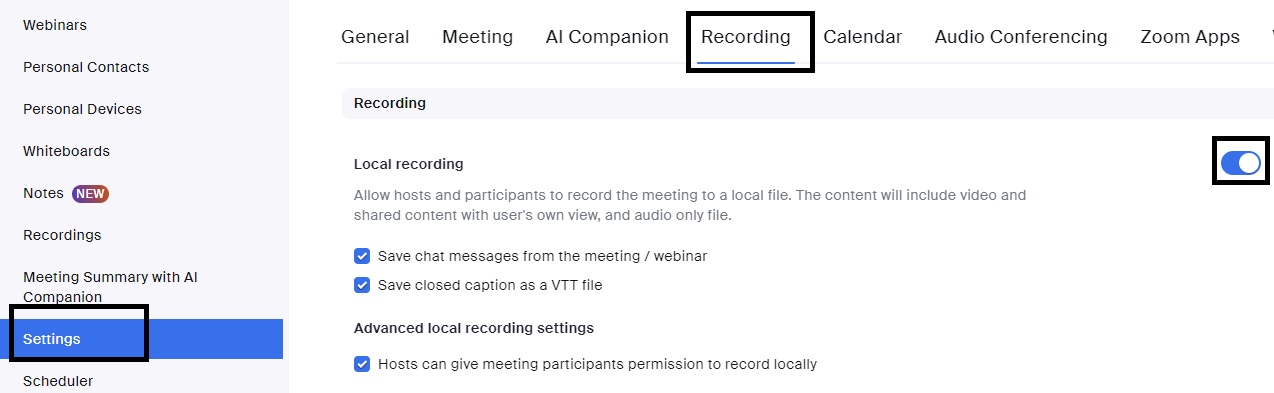
2. In the navigation menu, click Settings.

3. Click the Recording tab.

4. Under the Recording section, click the Local Recording toggle to enable it.

5. If a verification dialog appears, click Enable to verify the change.


Support

General Enquiries cchelp@ust.hk
Suggestions & Complaints cclisten@ust.hk
Serviceline +852-2358-6200