
An SSL certificate is a digital credential installed on a web server to enable HTTPS encryption. It protects data exchanged between a user’s browser and a website, such as login credentials, personal information, and other sensitive data. In addition to encrypting communications, the certificate helps verify that the website is authentic, increases user confidence, and reduces the risk of interception, tampering, or impersonation attacks. For university services, SSL certificates are essential for protecting online systems and maintaining trust in official web applications.
We provide two methods for users to manage SSL certificates, depending on the system environment, operational needs, and level of automation required. Users may choose an automated approach for streamlined lifecycle management, or a manual approach for systems that require direct administrative control.
The workflow diagram below gives a simple overview of how to request, install, and renew a certificate for your HKUST website or online service.
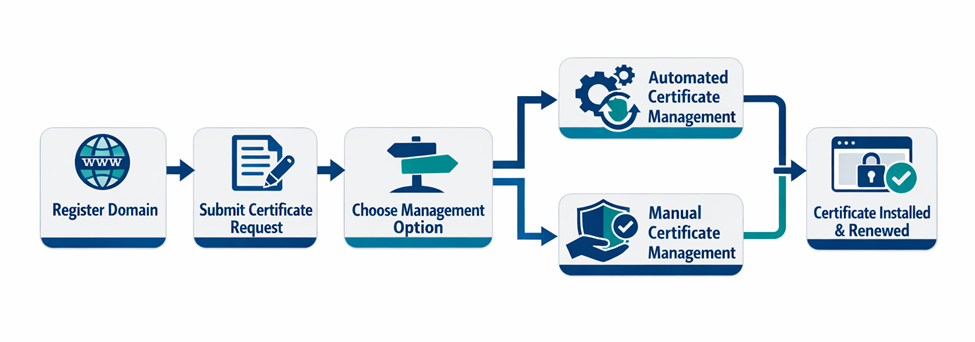
In summary, users first register the website domain and submit a certificate request, then follow either the automated or manual management process to complete setup and renewal. Following the appropriate process helps keep HKUST websites secure, trusted by browsers, and continuously available to users.
Free
7x24
Important notice:
SSL certificates expire to maintain security, with maximum validity currently at 200 days, dropping to 100 days in early 2027 and eventually 47 days by 2029.
|
Effective Date |
Maximum Validity Period |
|
Started from March 2026 |
200 days |
|
Starting March 15, 2027 |
100 days |
|
Starting March 15, 2029 |
47 days |
Remark: Expired certificates cause browsers to show warning messages, leading to user distrust, potential data breaches, and service interruptions.
Certificate Renewal:
SSL certificates must be renewed before they expire to prevent site downtime, security warnings, and revenue loss. Certificate renewals can be performed through either the Automated Certificate Management process or the Manual Certificate Management process via the online request form.